Welcome to Your
CRI-600s
Let's get you listening. Most people are paired and in their first session in under two minutes.
1. Turn them on. Hold the center power button for about 5 seconds until you see the red and blue lights alternating. You'll hear a soft tone. They're awake and looking for your device.
2. Find them on your phone. Open Bluetooth settings on your phone, tablet, or computer. Look for CRI-600 in the list of available devices. Tap to connect.
3. That's it. Press play. The light turns solid blue when you're connected. Open your Holosync track, your favorite music, or whatever you love to listen to. You're ready.
First time? We recommend starting with a familiar Holosync track at low-to-medium volume so you can experience the difference these headphones make.
CRI-600 Quick Start Pair and Play in Under 2 Minutes
Know Your Headphones
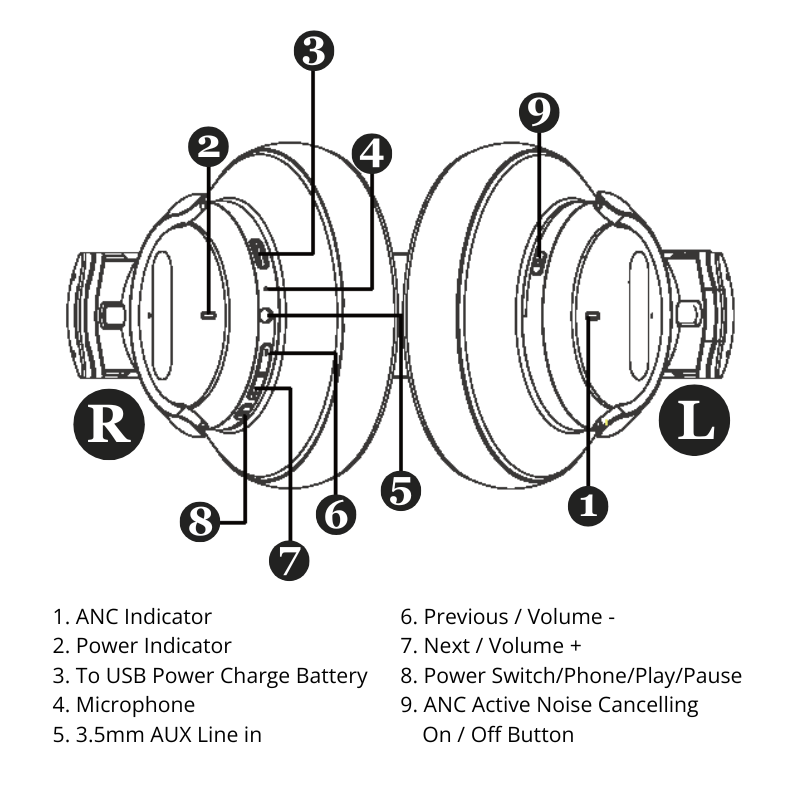
1. ANC Indicator
2. Power Indicator
3. USB-C port — For charging. Any USB-C cable works.
4. Microphone
5. 3.5mm AUX Jack — For optional listening with an aux cable (not included), if you prefer a wired connection.
6. Volume Down (−) / Previous Track — Tap to lower the volume. Hold to go to the previous track.
7. Volume Up (+) / Next Track — Tap to raise the volume. Hold to skip to the next track.
8. Power Switch / Phone / Play / Pause — One press plays or pauses. Double-press activates your phone's voice assistant. Hold 5 seconds to turn on or off.
9. ANC Active Noise Cancelling On / Off Button — Press to cycle through your listening modes: Transparent Mode → Noise Cancelling Low → Noise Cancelling High → Noise Cancelling Off.
How To
How to pair with a new device
Your CRI-600s remember the last device they were connected to. To pair with something new:
- Turn the headphones off.
- Hold the power button for about 10 seconds — 5 seconds past the usual power-on point — until the red and blue lights flash rapidly.
- They are now in pairing mode and visible to any nearby device.
- Open Bluetooth on your new device and select CRI-600.
The light turns solid blue when the connection is made.
How to choose your listening mode
Your CRI-600s have four listening modes. Press the ANC button to cycle through them. A soft tone confirms each change.
Transparent Mode — Lets outside sound in, so you can hear a conversation or stay aware of your surroundings without removing your headphones.
Noise Cancelling Low — A gentle dampening. Good for home, office, and cafes when you want to soften the world without disappearing from it.
Noise Cancelling High — Deepest quiet. Best for meditation or Holosync sessions in a noisy environment, flights, and focused work.
Off — Both noise cancelling and transparency disabled. Uses less battery.
For Holosync sessions, we recommend Noise Cancelling High. It creates the deepest possible stillness around you, allowing the frequencies to do their work with less distractions or interruptions.
How to answer a call or use your voice assistant
Answer a call: One press of the power button.
End a call: One press of the power button.
Reject a call: Press and hold the power button for about 2 seconds.
Use Siri or Google Assistant: Double-press the power button. (Device must be unlocked)
The built-in microphone handles calls clearly. Your Active Noise Canceling (ANC) setting stays active during calls.
How to charge your headphones
Use the included USB-C cable. Any standard USB power source works — your computer, a phone charger, or a USB wall adapter.
- Charging time: Less than 2 hours for a full charge.
- Light while charging: Solid red.
- Light when fully charged: Solid blue.
- Listening time: Up to 30 hours with noise cancelling on.
- Standby time: Up to 500 hours.
Pro tip: If you're not going to use your headphones for a while, power them off by holding the power button for 5 seconds. They'll hold a charge for weeks.
How to reset your headphones
If something feels off — they won't pair, they won't connect, or the buttons are behaving strangely — a “factory reset” almost always resolves it. Here’s how to do it:
- Disconnect your headphones from your device.
- Hold the Volume Up (+) and Volume Down (−) buttons together for about 5 seconds.
- The lights will flash purple and then the headphones will power down.
- Turn them back on. They are now freshly reset as if from the factory and ready to pair.
Getting the Most From Holosync
Your CRI-600s were designed around one question: How do we create the most immersive, accurate, and comfortable Holosync experience possible?
Here's what we learned along the way, and what we recommend for your practice.
Use Noise Cancelling High for your sessions
Holosync works best when your mind has nothing to push against. The deepest noise cancelling mode removes the world's low hum — traffic, air conditioning, the refrigerator in the next room — so you can sink into stillness without distraction.
Set your volume lower than you think you need
Holosync tracks are engineered to work at comfortable listening levels. You do not need to feel them loudly. In fact, a gentler volume often produces a deeper experience, because your nervous system isn't bracing against the sound.
Start at about 30% volume. Adjust from there.
Give yourself the full 30-60 minutes
Your CRI-600s are designed for long sessions. The ear cups rotate to match the shape of your head, and the materials stay comfortable far longer than typical headphones. You won't need to take them off early. Sink in.
Keep them charged, keep them close
A CRI-600 with 30 hours of battery life can cover a full week of daily sessions on a single charge. Charge them on a predictable rhythm — Sunday evenings, for example — and they'll always be ready when you are.
Troubleshooting
My headphones won't turn on
Try charging them for 10–15 minutes with the included USB-C cable, then hold the power button for 3 seconds. If the red light appears while charging, they are receiving power and will come back shortly.
They won't pair with my phone
Make sure the headphones are in pairing mode — the red and blue lights should be flashing rapidly. If they aren't, turn the headphones off, then hold the power button for about 5 seconds until the rapid flashing begins.
On your phone, make sure Bluetooth is on, and that the CRI-600s aren't already listed in your paired devices from a previous attempt. If they are, tap Forget and try pairing again.
Only one side is playing
This is almost always a connection issue, not a hardware problem. Turn the headphones off, hold the Volume Up and Volume Down buttons together for 5 seconds to reset, then pair again. The sound should return to both sides.
The battery seems to drain quickly
Noise cancelling uses more power than standard listening. If you're running ANC High continuously at high volume, you'll see battery life closer to the lower end of our estimate. Try Noise Cancelling Low or Off when you don't need the deepest quiet.
Also: if the headphones aren't fully powering off (you turned off the audio source but didn't hold the power button), they may still be drawing power in standby.
Noise cancelling sounds strange or makes my ears feel pressurized
This is normal when you first turn on deep ANC in a quiet room — your ears adjust within a minute or two. If the sensation persists, try Noise Cancelling Low instead, or turn Noise Cancelling off.
I can't remember which device they're paired to
Turn your headphones off and back on. They will announce (via a soft tone) when they reconnect to the most recent device. If you want to start fresh, do a full reset (Volume Up + Volume Down held for 5 seconds) and re-pair.
My question isn't here
Reach out to our support team at the bottom of this page. We'll help.
Full Specifications
Spec | Value |
Frequency Response | 4Hz – 20kHz |
Driver Size | 40mm |
Driver Type | Neodymium |
Impedance | 32Ω ±15% |
Sensitivity | 113.5 ±3dB (SPL at 1kHz) |
Signal-to-Noise Ratio | 70dB |
Bluetooth Version | 5.1 |
Bluetooth Codecs | AAC, mSBC |
Battery | 800mAh Lithium-Ion |
Listening Time | Up to 30 hours |
Charge Time | Less than 2 hours |
Standby Time | Up to 500 hours |
ANC Modes | Low, High, Transparency, Off |
Charging Port | USB-C |
Analog Input | 3.5mm (1/8") stereo |
Care & Warranty
Caring for your CRI-600s
- Wipe the ear cups with a soft, dry cloth after each use.
- Avoid leaving them in direct sunlight, extreme heat, or humid environments.
- Don't fully submerge them in water. (They handle light sweat, not swimming.)
Warranty
Your CRI-600s are covered by a one-year limited warranty against manufacturing defects. If something isn't right, we'll make it right.
We're Here for You
If anything isn't working the way it should, reach out. Real humans, real help.
Email: support@centerpointe.com
Phone: 503-672-7117
Hours: Monday–Friday, 9am–4:30pm Pacific
©2026 Centerpointe Research Institute